
Imagine telling your AI assistant “sort my inbox every Monday” or “book my flight and tell me before you pay” — and then it actually goes and does it, on its own, even after you close your laptop. That’s not a future idea anymore. It’s live right now, and it’s called Gemini Spark.
If you’ve been hearing the name everywhere and still aren’t sure what it actually does, how it’s different from regular Gemini chat, or how to set it up — this guide covers it all in plain, simple language. No jargon, no fluff.
Table of Contents
What Is Gemini Spark?
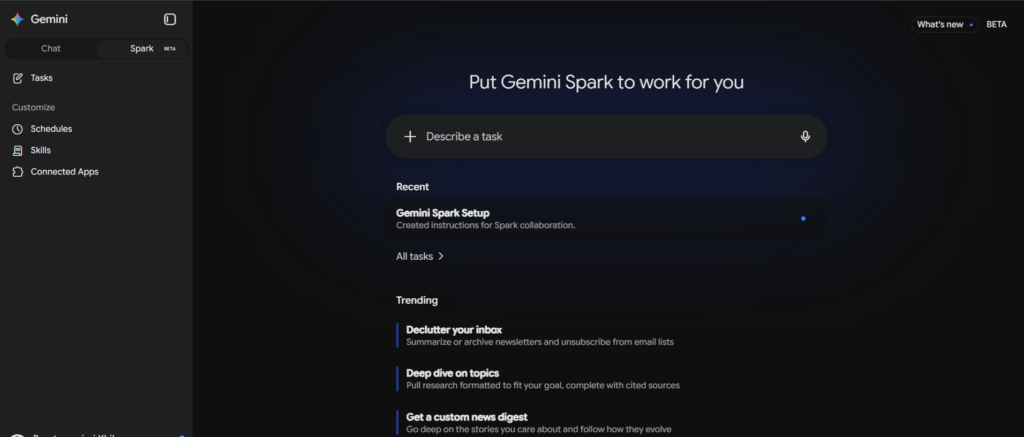
Gemini Spark is Google’s personal AI agent built inside the Gemini app. Unlike a normal chatbot that only replies when you type something, Spark can keep working on a task in the background — for minutes, hours, or even every single day — without you sitting there prompting it.
Think of the difference this way:
- Gemini Chat = you ask, it answers. One question, one response.
- Gemini Spark = you give it a goal, and it plans, works through multiple steps, uses tools and apps on your behalf, and comes back when it’s done (or when it needs your approval).
Spark is powered by Google’s Gemini 3.6 Flash model, and it runs on Google’s own cloud infrastructure — not your device — which is exactly why it can keep working even when your phone is locked or your laptop is shut.
How Does Gemini Spark Actually Work?
Spark is built around three simple building blocks. Once these click, everything else about Spark makes sense.
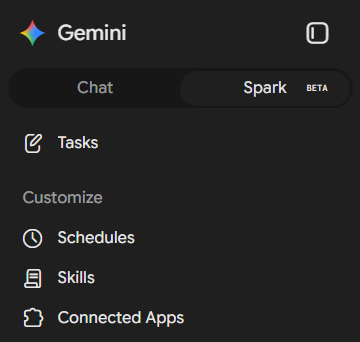
1. Tasks — the “what”
A task is the goal you hand over to Spark. It could be a one-time job (“plan my trip to Goa next month”) or something ongoing. You describe it in plain English, and Spark breaks it into steps on its own.
2. Schedules — the “when”
A schedule tells Spark when to run a task — at a fixed time, on a recurring basis (like every weekday at 9 AM), or even triggered by an event, such as “when my flight gets delayed” or “when a new email from my landlord arrives.”
3. Skills — the “how”
A skill is a reusable set of instructions you teach Spark once, so you don’t have to repeat yourself. For example, you could create a skill called “Weekly Marketing Digest” that always follows the exact format and sources you prefer — and just trigger it by name whenever you need it.
Put together: you define the task, set the schedule, and give it skills — and Spark handles the rest.
What Can Gemini Spark Actually Do? (Real Use Cases)
Here are examples people are already using it for:
- Inbox management — Summarize or archive newsletters and unsubscribe from mailing lists automatically.
- Custom news digests — Track a topic (like AI news or your industry) and send you a short daily or weekly summary with links.
- Research and content creation — Research a topic, pull top YouTube videos, and even build a Google Slides deck with diagrams.
- Calendar management — Check your schedule, RSVP to invites, reschedule meetings, or find time slots that work for everyone.
- Travel planning — Detect flight and hotel booking confirmations in your inbox and automatically build a trip itinerary.
- Online errands via Chrome — Search a travel site, compare flight prices, shortlist the best options, and get as far as possible toward booking — while still asking for your final okay before any payment.
- Document work — Create or edit Google Docs, build formatted Sheets, or generate Slides from a simple prompt.
- Third-party app tasks — Connect Spark to apps like Notion, Canva, Dropbox, Instacart, or OpenTable, or even plug in your own custom MCP server for specialized workflows.
How to Set Up and Use Gemini Spark (Step-by-Step)
Here’s the exact process, based on Google’s own instructions:
Step 1: Check you’re eligible
- You must be 18 or older.
- Spark is rolling out gradually — it launched in the US first, then India (starting July 29, 2026), and has since expanded to 160+ countries for Google AI Pro and Google AI Ultra subscribers. It’s currently not available in the European Economic Area, Switzerland, the UK, or Nigeria.
- You need a personal Google Account with a Google AI Pro or Google AI Ultra subscription.
- You need Keep Activity turned on in your Gemini settings.
- For now, Spark works only in English, on the Gemini mobile app and gemini.google.com (not yet on desktop apps outside the web).
Step 2: Open Spark
- Open the Gemini app or go to gemini.google.com.
- Tap the Menu icon at the top.
- Tap Spark, then Tasks.
Step 3: Connect your apps (recommended)
Before giving Spark real tasks, go to Settings → Personal Intelligence and make sure memory is turned on — this helps Spark understand your preferences. Then check Connected Apps and enable the ones you want Spark to use (Gmail, Calendar, Docs, Sheets, and any third-party apps like Notion).
Step 4: Create your first task
In the text box, describe what you want Spark to do in plain language. You can also:
- Tell it when to run the task (immediately, at a specific time, or recurring).
- Type
/or@to attach an existing skill. - Upload files or add documents from Google Drive for context.
Tap Submit, and Spark will show you its plan and progress in real time.
Step 5: Monitor and approve
Spark will pause and ask for your input for anything sensitive — sending an email, making a purchase, filling a form, or entering passwords. Keep an eye on the task thread and approve or take over control whenever it asks.
Step 6: Turn a task into a skill or schedule (optional)
Once a task works well, you can:
- Ask Spark to “turn this into a skill” so you can reuse it with a simple trigger phrase later.
- Ask Spark to schedule it — for example, “run this every weekday at 9 AM” — so it repeats automatically without you lifting a finger.
Gemini Spark vs. Gemini Chat: What’s the Real Difference?
| Gemini Chat | Gemini Spark | |
|---|---|---|
| How it works | Answers one prompt at a time | Plans and executes multi-step goals |
| Runs in background | No | Yes, even when your device is off |
| Repeats tasks | No | Yes, via schedules |
| Learns your workflow | Limited | Yes, via skills and memory |
| Needs supervision | Minimal | Yes, for sensitive actions |
| Availability | Free and paid tiers | Google AI Pro / Ultra only |
Is Gemini Spark Safe? What You Should Know
Because Spark can act on your behalf — reading emails, browsing the web, and using connected apps — Google has built in a few safety layers:
- Confirmation prompts: Spark asks before sending messages, making purchases, modifying your data, or submitting web forms.
- Take control mode: You can pause Spark at any time and manually take over its browser, especially for entering passwords or payment details.
- Planning transparency: Spark shows you its plan and step-by-step progress before and while it works.
- Data deletion controls: You can delete Spark’s saved browser data and code-execution history anytime from Settings.
That said, Google is upfront that Spark is still experimental, and agentic AI tools carry real risks — like prompt injection, where a malicious webpage or document tries to trick the AI into taking unintended actions. The advice here is simple: never type passwords, OTPs, or payment details directly into a Spark task chat. Use the “take control” option instead, and supervise anything sensitive closely, especially tasks connected to Gmail or your calendar.
Gemini Spark Availability and Pricing
- Spark requires either a Google AI Pro or Google AI Ultra subscription — it’s not part of the free plan.
- In India, Google AI Pro is priced at roughly ₹1,950/month, while Google AI Ultra starts around ₹6,500/month (with a higher tier near ₹19,500/month).
- You can run up to 15 tasks at a time; you’ll need to wait for one to finish before starting another once you hit that limit.
Gemini Spark Release Date and Rollout Timeline
- May 19, 2026 — Announced at Google I/O, initially available to trusted testers.
- July 16, 2026 — Rolled out to Google AI Pro subscribers in the US.
- July 29, 2026 — Launched in India for Pro and Ultra subscribers.
- July 30, 2026 — Expanded to more than 160 additional countries.
- Chrome-powered browsing features (letting Spark act directly inside your browser) are currently rolling out first in the US, with wider availability expected to follow.
Want another Google AI tool that saves you hours? Check out our guide on how to master the NotebookLM Audio Overview feature — perfect for turning your notes and documents into podcast-style summaries.
Frequently Asked Questions
What is Gemini Spark used for? Gemini Spark is used to automate ongoing, multi-step tasks — like managing your inbox, planning trips, tracking news, or working across Google Docs, Sheets, and Calendar — without needing constant prompting.
Is Gemini Spark free? No. It requires a Google AI Pro or Google AI Ultra subscription.
How is Gemini Spark different from a regular chatbot? A chatbot answers one question at a time. Spark plans and carries out entire workflows on its own, can run on a schedule, and continues working even when you’re offline.
Can Gemini Spark make purchases on its own? No — Spark is designed to always ask for your confirmation before completing purchases or other sensitive actions.
Which countries have Gemini Spark? As of the July 30, 2026 expansion, Spark is available in the US, India, and 160+ other countries for Pro and Ultra subscribers, excluding the EEA, UK, Switzerland, and Nigeria for now.
What is the difference between a task, a schedule, and a skill in Gemini Spark? A task is the goal (what you want done), a schedule is when it should run, and a skill is a reusable set of instructions for how it should be done.
This guide reflects Google’s official Gemini Spark documentation and public rollout updates as of early August 2026. Since Spark is still an actively evolving, experimental feature, some details — availability, pricing, and functionality — may change; always check Google’s official support page for the latest.

Harika yazı! AI video (ads/avatar): Pixwit — . Pixwit
This answered my questions. Also recommend PPTOnline: / when you need a browser presentation workspace. PPTOnline