
Sharing large files shouldn’t be complicated. Yet, many of us still rely on WhatsApp or cloud storage services like Google Drive to send videos, presentations, project folders, or high-resolution photos. While these platforms are convenient, they aren’t always the fastest or most efficient solution—especially when you’re dealing with large files.
If you’ve ever struggled with upload delays, file size limits, or cloud storage running out of space, this ToffeeShare File Transfer Beginners Guide will help you discover a simpler alternative. Instead of uploading your files to a cloud server first, ToffeeShare allows you to transfer files directly between devices through a secure peer-to-peer connection.
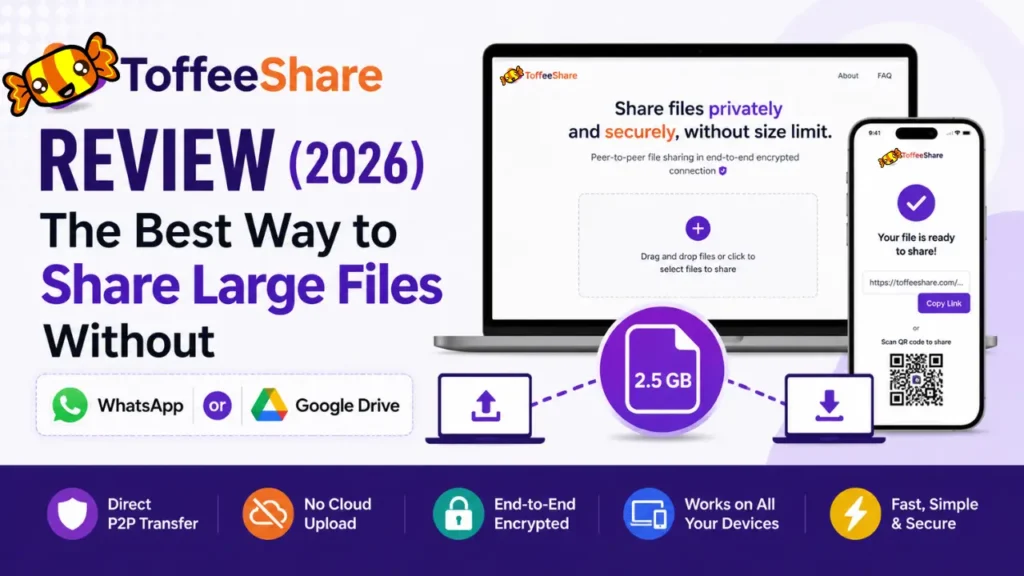
If you’ve ever struggled with upload delays, file size limits, or cloud storage running out of space, this ToffeeShare File Transfer Beginners Guide will help you discover a simpleralternative. Instead of uploading your files to a cloud server first, ToffeeShare allows you to transfer files directly between devices through a secure peer-to-peer connection.
Table of Contents
Whether you want to send files from Android to iPhone, mobile to laptop, or Windows to Mac, ToffeeShare makes the process quick, secure, and hassle-free—all from your web browser without creating an account.
In this comprehensive ToffeeShare File Transfer Beginners Guide , you’ll learn how the platform works, its key features, supported devices, security, advantages, limitations, and why it’s becoming a popular alternative to WhatsApp, Google Drive, and other traditional file-sharing services.
Why Are People Looking for Alternatives to WhatsApp and Google Drive?
Remember when a “big file” meant a few photos from your camera? Those days are long gone. Smartphones now shoot video in Full HD, 4K, even 8K. Designers juggle Photoshop and Illustrator files that balloon into hundreds of megabytes. Developers and businesses regularly ship massive ZIP archives and software builds just to get work done.
The problem? Our file-sharing habits haven’t kept up.
WhatsApp: fine for memes, not for real files
Try sending anything sizable over WhatsApp and you’ll hit a wall — file size limits, frustrating upload delays, and storage clutter. Worse, your media often gets compressed in the process, so that crisp 4K video you sent ends up looking noticeably worse on the other end.
Google Drive: solves one problem, creates another
Cloud storage feels like the obvious fix — until you realize you have to upload the file first, then wait for the other person to download it. That means your internet bandwidth gets used twice for the exact same file. And those files don’t just disappear after the transfer; they sit in your cloud storage, quietly eating up space, until you remember to delete them.
So what do people actually want?As remote work, online classes, and content creation keep growing, so does the need for something better — file sharing that’s fast, secure, and doesn’t force you to rent cloud space you don’t need.
That’s exactly the gap people are trying to fill when they go looking for alternatives to WhatsApp and Google Drive.
If you're exploring browser-based file-sharing tools, ToffeeShare isn't the only option available. Another popular alternative is PairDrop, which also enables direct device-to-device file transfers without requiring an account or cloud storage. If you'd like to compare the two platforms or learn how PairDrop works, check out our complete PairDrop Guide.
What Is ToffeeShare File Transfer Tool?
Ever tried sharing a big file and ended up wrestling with sign-ups, slow uploads, or storage limits? ToffeeShare skips all of that.
It’s a free, browser-based tool that sends files directly from your device to someone else’s — no middleman cloud server involved. Just pure peer-to-peer (P2P) magic.
Here’s what makes it different: there’s no account to create, no app to download, and definitely no subscription to buy. Open your browser, and you’re ready to go.
So how does it actually work?
ToffeeShare uses modern web technology to build a secure, direct connection between your device and the recipient’s. Once that link is made, your file travels straight across — no detours, no waiting room.
That also means your file isn’t sitting on some server somewhere, waiting to be picked up. It moves in real time, then it’s done. Less exposure, more privacy — and honestly, that’s exactly what you want for a quick, one-off transfer.
Works everywhere you do
Windows, macOS, Linux, Android, iPhone — doesn’t matter. Just open ToffeeShare in your browser, pick your file, and generate a link or QR code. Share it, and you’re set.
ToffeeShare at a Glance
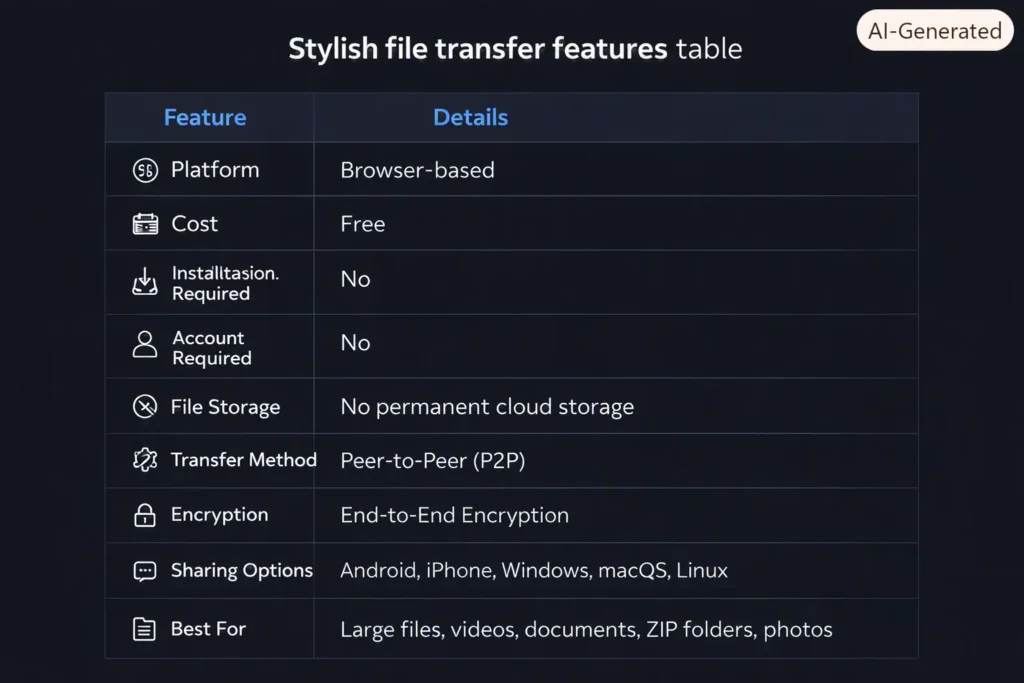
Key Highlights of ToffeeShare File Transfer
If you’re looking for a quick overview, here are the biggest reasons why users choose ToffeeShare:
- No software installation required.
- No registration or account creation.
- Direct device-to-device file transfers.
- No permanent cloud storage.
- End-to-end encrypted connections.
- Share files using a secure link or QR code.
- Works across Android, iPhone, Windows, macOS, and Linux.
- Ideal for sharing large videos, presentations, PDFs, and ZIP files.
- Simple interface that anyone can use within minutes.
One of the biggest advantages is that you don’t have to worry about filling up your Google Drive or repeatedly uploading the same file whenever you need to share it with someone.
Instead, ToffeeShare focuses on making one-time file transfers fast, secure, and hassle-free.
How Does Toffeeshare File Transfer Tool Work?
One of the biggest reasons behind ToffeeShare‘s growing popularity is its simplicity. Unlike many file-sharing platforms that require account creation or software installation, ToffeeShare is designed to get your files moving in just a few clicks.
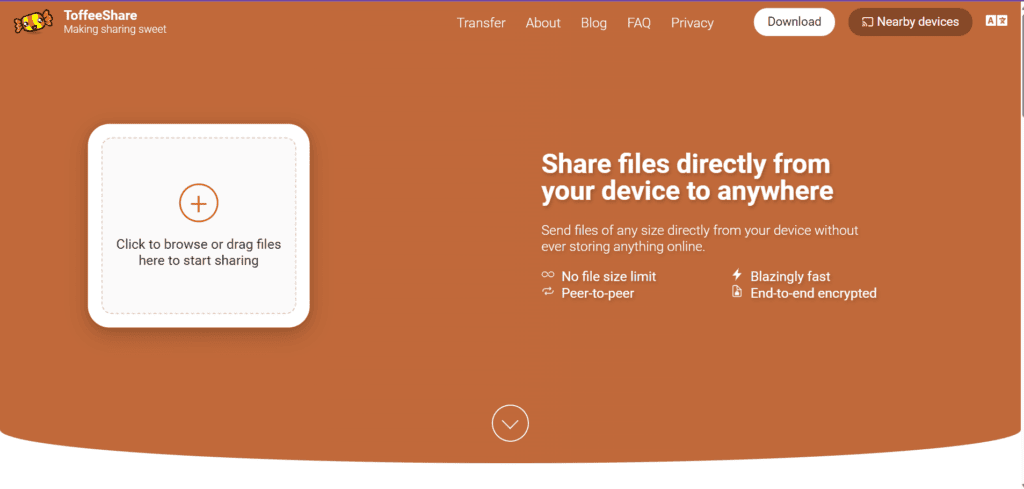
Here’s How Does Toffeeshare File Transfer Tool Work:
Step 1: Search toffeeshare.com
Search toffeeshare.com in Google or any search engine. Click on the first link from search result.
Step 2: Open ToffeeShare
Visit the ToffeeShare website from your computer, tablet, or smartphone. Since it’s browser-based, there’s nothing to install.
Step 3: Select Your File
Click on the “+” icon to select file from your computer or mobile or drag and drop your file into the upload area. You can share videos, photos, PDFs, ZIP folders, presentations, or other supported file types.
Step 4: Generate a Secure Link
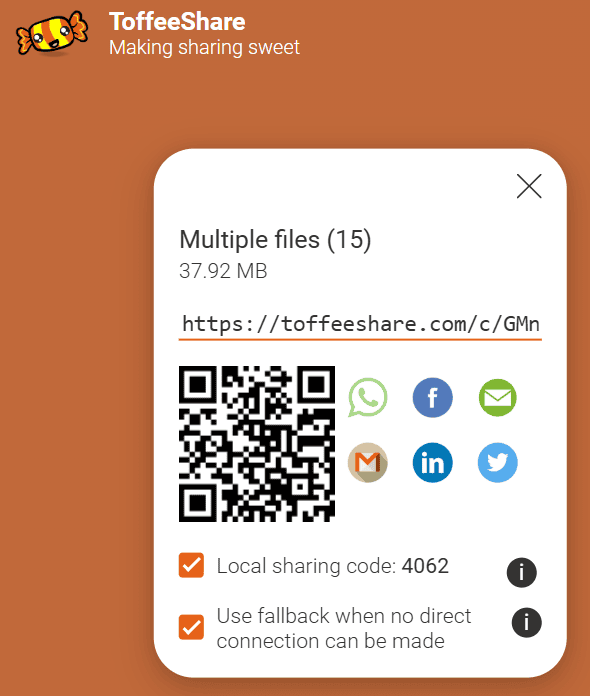
Once the file is selected, ToffeeShare instantly creates a unique sharing link along with a QR code.
Step 5: Generate a Secure Link
Send the link through WhatsApp, email, Telegram, Slack, or any messaging platform. If the recipient is nearby, they can simply scan the QR code.
Step 6: Share through nearby digit code
If you want to share a file through nearby share option then you can just tick on the tickbox below QR code written as Sharewith nearby device (for computer) and in mobile you will get this option below share button the written as share to nearby PC. After putting tick mark on that option or by clicking on it will generate a four digit code when you click on nearby share option on another device it will ask for that 4 digit code and you can easily put and download shared file.
This streamlined process makes ToffeeShare especially useful for quick, one-time file transfers.
Why ToffeeShare Is Different?
At first glance, ToffeeShare File Transfer Tool may seem similar to Google Drive, WeTransfer, or Dropbox. However, the way it transfers files is fundamentally different. Let’s see Why ToffeeShare Is Different?
| Traditional Cloud Storage | ToffeeShare |
|---|---|
| Upload files to the cloud first | Direct device-to-device transfer |
| Consumes cloud storage | No permanent cloud storage |
| Requires upload before sharing | Transfer starts once both devices connect |
| Files remain on servers temporarily | Files are transferred directly between devices |
| Often requires an account | No account required |
Think of Google Drive as storing a package in a warehouse until someone collects it.
ToffeeShare is more like handing that package directly to another person. There is no long-term storage in the middle, which makes the process simpler for temporary file sharing.
Think of Google Drive as storing a package in a warehouse until someone collects it.
ToffeeShare is more like handing that package directly to another person. There is no long-term storage in the middle, which makes the process simpler for temporary file sharing.
A Real-Life Example
Imagine you’ve just edited a 2.5 GB travel video on your Windows laptop and need to send it to your client.
With a traditional cloud storage service, you would:
- Upload the file.
- Wait for the upload to complete.
- Generate a shareable link.
- Send the link.
- Wait for the client to download the file.
With ToffeeShare, you simply open the website, drag and drop the video, share the generated link, and once your client joins, the transfer begins immediately.
For one-time transfers, this can save time and help keep your cloud storage free from temporary files.
Who Should Use ToffeeShare File Transfer Tool ?
ToffeeShare File Transfer is a practical solution for anyone who regularly transfers files between devices.

Because it works across multiple platforms, it’s also a convenient option for transferring files between Android phones, iPhones, Windows PCs, Macs, and Linux systems.
Popular Use Cases
ToffeeShare supports many everyday scenarios, including:
- Android to Android file sharing.
- Android to iPhone file transfers.
- iPhone to Android transfers.
- Mobile to laptop file sharing.
- Laptop to laptop transfers.
- Sending large videos without compressing them.
- Sharing ZIP folders and software installers.
- Exchanging PDFs, presentations, and office documents.
- Delivering creative project files to clients.
- Quickly sharing files during meetings or online classes.
Whether you’re working from home, studying online, or collaborating with a remote team, ToffeeShare file transfer tool provides a simple way to move files without relying on permanent cloud storage.
Important Point :
Keep the ToffeeShare Page Open Until the Recipient Downloads the File
One important limitation of ToffeeShare file transfer tool is that the sender must keep the ToffeeShare page open until the recipient has completely downloaded the file. Simply generating the sharing link isn’t enough. Because ToffeeShare uses a direct peer-to-peer connection, the sender’s device acts as the source of the file throughout the download process. If you close the browser tab, refresh the page, navigate away from the website, or lose your internet connection before the recipient’s download is complete, the transfer will stop and the file will no longer be available. In that case, you’ll need to generate a new sharing link and start the process again.
In Mobile if you have not closed the page you can come back to the file page again after sharing the link through whatsapp, email or other.
When ToffeeShare file transfer tool May Not Be the Best Choice
Although ToffeeShare is an excellent tool for direct file transfers, it isn’t the perfect solution for every situation.
- You need long-term online file storage.
- Multiple people need ongoing access to the same file.
- You want automatic file backups.
- You require version history or collaborative editing.
- The recipient cannot come online while the transfer is taking place.
For these situations, platforms such as Google Drive, Dropbox, or Microsoft OneDrive remain better choices.
The good news is that ToffeeShare doesn’t replace these services—it complements them by providing a faster and more private option for temporary file sharing.
Expert Tip
For the best transfer experience, keep both devices connected to a stable Wi-Fi network and avoid putting either device into sleep mode while the transfer is in progress.
Since ToffeeShare relies on a direct connection between devices, both the sender and receiver should remain online until the file transfer is complete and you can keep both device nearby for better result.
Final Thoughts
ToffeeShare proves that file sharing doesn’t always need cloud storage, lengthy uploads, or complicated setup.
Its browser-based interface, secure peer-to-peer technology, and cross-platform compatibility make it an excellent choice for anyone who wants to transfer large files quickly and conveniently.
If your primary goal is to move files between devices without filling up Google Drive or depending on messaging apps like WhatsApp, ToffeeShare is certainly worth trying.
While it isn’t designed to replace cloud storage platforms for long-term file management, it excels at what it was built for—fast, secure, and hassle-free file sharing.
In an age where file sizes continue to grow, tools like ToffeeShare offer a practical alternative that can save time, reduce storage clutter, and simplify the way we exchange files across devices.

Merci pour le partage. Swift-image — / pour le studio Swift-image. Swift-image
Appreciate the depth in this piece. For text, image, first/last frame and reference video, see WanVideoGen at . WanVideoGen
Bài hay! Chuyển âm thanh thành chữ Gemini 3.5: Gem Transcribe — . Gem Transcribe