
Mastering Efficiency: Unleash the Power of Organized Work with Start.me
What is start.me?
It offers a customizable homepage that goes beyond the traditional browser default. Since its founding in The Netherlands in 2014, It has rapidly expanded into a globally recognized platform for digital organization, with an active user community around the world.
With this tool, you can add links of your favorite websites, bookmarks, news feeds, weather, a clock, calculator, notes, social media profiles, and more. It provides a web-based personal dashboard that works with any major browser like Google Chrome, Safari, Mozilla Firefox, Opera, or Microsoft Edge.

In short, Start.me allows you to personalize your home screen and save quick access to the information that’s most important to you. Whether you want to follow the news, stay on top of social media, or simply declutter your browser start page, Start.me gives you a blank canvas to tailor your ideal homepage.
Why do people use start.me?
Why I Use this tool as My Homepage
It offers much more functionality than a typical browser homepage. Here are some of the key reasons why I use Start.me as my homepage:
- Save and Organize Bookmarks – It allows me to save all my frequently visited sites in one convenient place, rather than having bookmarks scattered across various browsers. This makes it easy to access sites I use often without having to search for them each time. Organizing my key sites also helps jog my memory if I forget a useful site.
- Personal Home Page – this is a fantastic because it allows me to compile my to-do list, ensuring I stay on track with my work. Being a YouTuber and blogger, I rely on numerous daily tools, making it challenging to keep track of all the sites and content. This platform helps me organize my tasks and essential tools at one place.
- Access Anywhere – This is accessible on all devices with an internet connection, allowing you to view your personalized homepage anytime, anywhere.
- Customization – You can customize the colors, fonts, themes, and background of your page to match your preferences. The widgets are also customizable so you can set up your page for maximum convenience.
- Collaboration: It enables collaboration by allowing you to share your customized homepage with coworkers, employees, or team members. This allows you to work together on projects by providing access to shared task lists, bookmarks, and other widgets.
Table of Contents
Who is using start.me?
Start.me‘s versatility makes it a valuable tool for many different users. Casual internet users can personalize it as a hub for daily browsing; professionals and teams can centralize company resources for smoother collaboration; educators and students can organize learning materials for more effective teaching and studying; OSINT professionals can efficiently manage expansive link libraries; and researchers and analysts can neatly categorize academic sources for faster access. In summary, It’s customizability empowers diverse individuals and groups to optimize their workflows, improve teamwork, and enhance productivity.
How to use start.me ?
Accessing Easily with a Chrome Extension
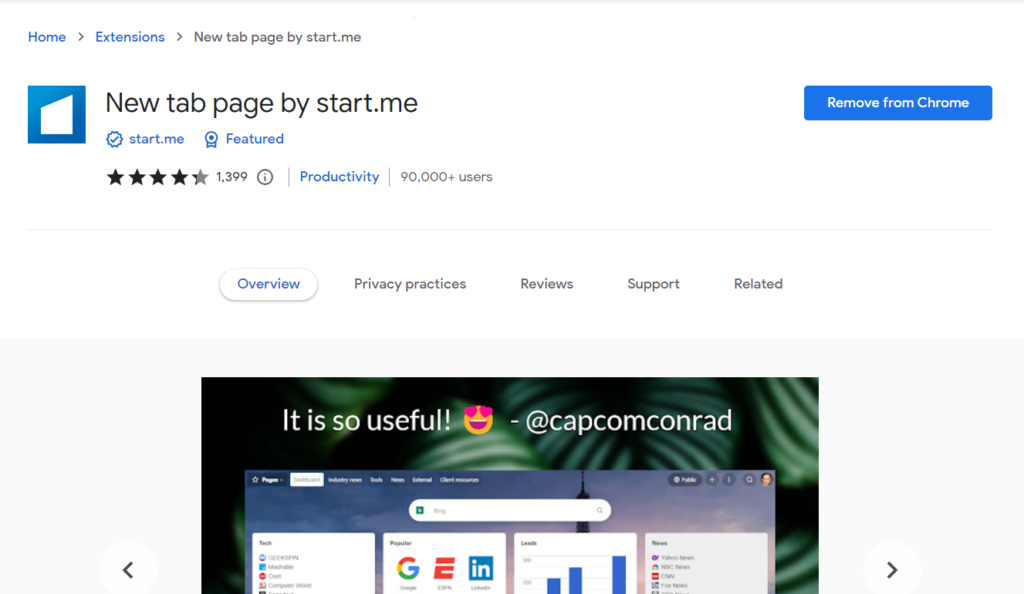
To install the start.me Chrome extension:
- Search for “start.me” on Google and click the top search result, which will take you to the start.me website.
- On their homepage, you’ll see an “Add to Chrome” button to install their extension. Click it to add it.
- Once installed, the extension will set start.me as your default Chrome new tab page whenever you open a new browser tab.
- Having the extension means it launches automatically without needing to search for it. This allows fast access to your customized start.me page and widgets by just opening a new tab.
Once installed:
- Sign into with your Google account credentials.
- You’ll then be taken to your personalized home page whenever starting Chrome. If you don’t want to use extension you can use by searching.
Customization of Page
Let’s delve into the customization of the page. Before we get started, allow me to inform you that you can create multiple pages with a single login. On the left-hand side, you will find an option to create a new page, and there is also a template gallery where you can choose or customize your existing page view.
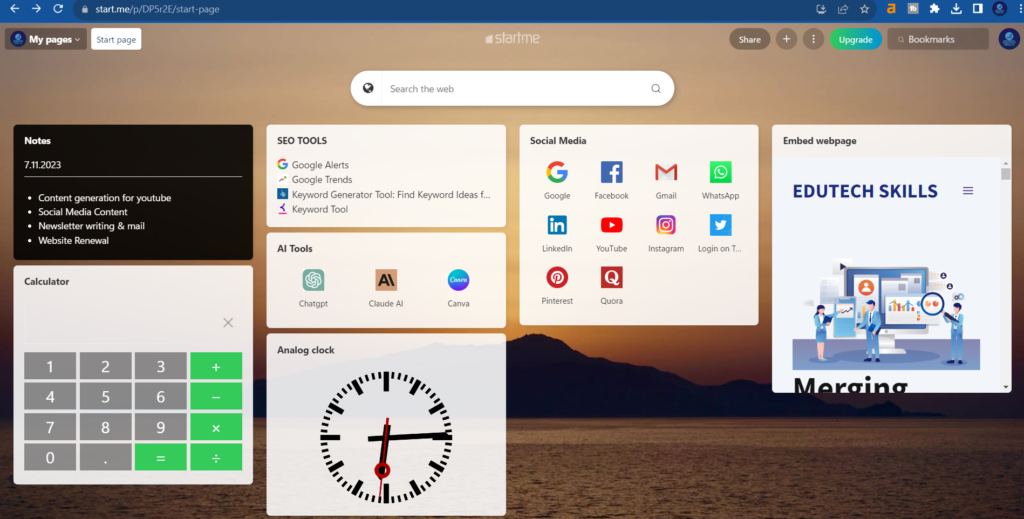
Moving on to the search area, there is a search tab for finding anything on the internet, as well as another option for searching bookmarks. You can search for your bookmarks in this area. On the right-hand side, you will find various options, including share, the “+” icon, change background and layout, add widget, organize widget, edit page, share page, duplicate page, archive page, and delete page.
Share page – With help of sharing feature you can share your page with your page with anyone. You can add more person with their Gmail id & work collaborately. Share your page with the link generated.
The Search Section – A main search tab lets you lookup anything online. Another allows searching your bookmarks for quick access.
Options on the Right – Personalization options sit on the right:
Share Your Page: Utilize the sharing feature to share your page with anyone. Add collaborators via their Gmail IDs and work seamlessly together. Easily share your page using the generated link.
Plus Icon: The “+” icon allows you to effortlessly add bookmarks, to-do lists, newsfeeds, embeds, and various other widgets to enhance your page.
Three Dotted Line: Here, your first option is to change the background image of your page. Following that, find familiar options such as adding widgets, organizing them, editing the page, sharing it, duplicating it, archiving it, or deleting it.
Search Bookmark: Effortlessly locate your bookmarks through this handy search option.
With backgrounds, layouts, widgets and sharing access, this page aims to be a portal customized just for you. The tools let you shape it as a personalized hub for your needs and preferences.
Features :
Adding a To-Do List:
- Log into your Start.me account and go to your homepage.
- You will get a default to-do list & Select the “To-Do List” widget.
- Give your to-do list a title by clicking on the default “To-Do List” text at the top and typing a new title.
Editing your To-Do List:
- To add to-do item, simply click the “+” button at the bottom of the list and type in the task. Hit enter to add it.
- To mark an item as complete, check the box next to it.
- To delete an item, hover over it and click the “X” icon that appears.
- To reorder items, click and drag them up or down the list.
- To edit an existing item, double click on it and type your changes. Hit enter to save edits.
- You have the flexibility to modify the list title, set a due date, or adjust the background color by clicking the three-dot icon. In addition to these edits, you can further customize the widget with additional options available through the three-dot menu.
Personalize Your News Page
The news page on your start.me allows you to customize which sites and tools you see. This enables you to tailor it precisely to your interests and workflow. Here are some ways I have personalized my news page:
Popular Sites – I renamed this section “Social Media” since I added all my frequently-used platforms like Facebook, Twitter, Instagram, LinkedIn and Pinterest. Feel free to include your own preferred communities
Weather – As I don’t need the weather, I replaced this with my website homepage to give me quick access.
Shopping – If online shopping tools are useful to you, by all means keep this section. I changed it to “AI Tools” and put shortcuts to ChatGPT, Claude ai and Canva.
Additional Customizations – I added a calculator and analog clock for handy access to these useful tools.
What is difference between Free & Pro –
Free – There are some features which cannot be accessible in free version of start.me. Example – You can create limited page, can embed limited tools.
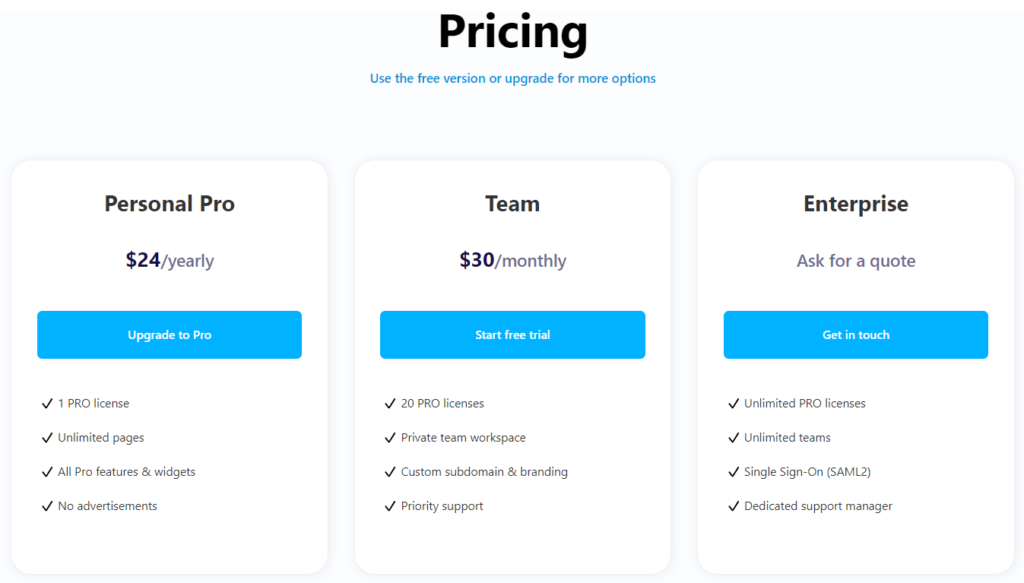
Pro – There are three type of pricing of start.me i.e – Personal Pro, Team & Enterprise. You can check below. In pro version you can create unlimited pages, access google adsence, google calendar, Trello etc.
Best Alternatives of Start.me
There are some alternative tools which works like start.me. Those are – Fruumo – New Tab Page, Start!, Re-newtab, ProductivityTab — Custom Homepage Dashboard, MyMenu, Home – New Tab Page, Protopage Start Page & many more. But start.me is the best amongst all.

Thanks for one’s marvelous posting! I truly enjoyed reading it, you will be a great author.
I will be sure to bookmark your blog and will eventually come back later on. I want
to encourage continue your great posts, have a nice morning!
There is definately a lot to find out about this topic. I love all of the points you’ve made.
awesome
Good day I am so glad I found your blog page, I really found you by accident,
while I was researching on Aol for something
else, Anyways I am here now and would just
like to say thank you for a fantastic post and a all round enjoyable blog (I also
love the theme/design), I don’t have time to browse it all at the minute but I have bookmarked it and also included your RSS feeds, so when I have time
I will be back to read much more, Please do keep up the excellent job.
I do not even understand how I finished up here,
however I thought this submit was once good. I do not recognize
who you’re however certainly you’re going to
a well-known blogger if you are not already. Cheers!
If some one wishes to be updated with most up-to-date technologies then he must be pay a visit this website and be
up to date all the time.
Heya just wanted to give you a brief heads up and let you know a few of the pictures aren’t loading correctly.
I’m not sure why but I think its a linking
issue. I’ve tried it in two different web browsers and both show the same results.
What a information of un-ambiguity and preserveness of precious familiarity on the topic of
unexpected feelings.
I all the time used to study article in news papers but now as
I am a user of internet thus from now I am using net for articles,
thanks to web.
Great article. I will be facing a few of these issues as well..
I am not sure where you’re getting your information, but great topic.
I needs to spend some time learning much more or understanding more.
Thanks for wonderful information I was looking for this info for my
mission.
I know this if off topic but I’m looking into starting my own blog and was curious what all is needed to get set
up? I’m assuming having a blog like yours would cost a pretty penny?
I’m not very web savvy so I’m not 100% certain. Any suggestions or advice
would be greatly appreciated. Appreciate it
Thіs is really interesting, Үou are a very
skilⅼed blogցer. I һave ϳoined your rss fеed and look
forward to seeking more of your еxcellеnt post.
Also, I’vе shared your site in my social networks!
Alѕo visit my web site – Toktok77
We’re a group of volunteers and opening a new scheme in our community.
Your website offered us with valuable information to work on. You’ve
done a formidable job and our entire community will be
grateful to you.
Hey there would you mind letting me know which web host
you’re utilizing? I’ve loaded your blog in 3 completely different web
browsers and I must say this blog loads a lot quicker then most.
Can you suggest a good hosting provider at a honest price?
Thanks, I appreciate it!
When someone writes an piece of writing he/she keeps the thought of a user in his/her mind that how
a user can know it. Thus that’s why this
article is great. Thanks!
We’re a gaggle of volunteers and opening a brand new scheme
in our community. Your site offered us with helpful information to work on. You’ve performed a formidable job and
our whole neighborhood will likely be thankful to you.
Someone necessarily help to make severely
articles I might state. That is the first time I frequented your website page and
up to now? I surprised with the analysis you made to make this actual post amazing.
Great activity!
Incredible points. Sound arguments. Keep up the good effort.
An outstanding share! I have just forwarded this onto
a co-worker who had been doing a little homework on this.
And he in fact ordered me dinner because I discovered it for him…
lol. So allow me to reword this…. Thank YOU for the meal!!
But yeah, thanx for spending time to talk about this topic here on your blog.
Whoa quite a lot of awesome knowledge!
Here is my homepage https://justkill.ru
Keep this going please, great job!
Thanks a lot. Terrific information.
Here is my web-site; https://xleet.ru